
How to find your Marketcall API key
Your API key connects your Marketcall account to outside tools: RTB and ping-post setups, the Telegram alerts bot and your own scripts. It takes three clicks to find and copy.
Shortcut: when you are logged in, this link opens the page directly: marketcall.com/affiliate/api/key
Step by step
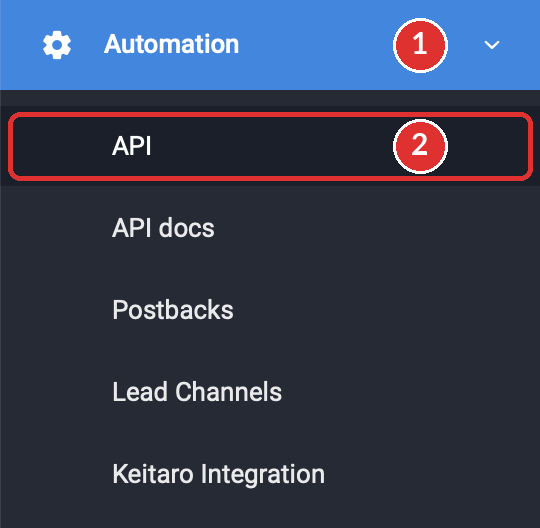
Open Automation, then API
- In the left menu of your affiliate area, click Automation. The section opens.
- Click API, the first item under it.
Copy your key
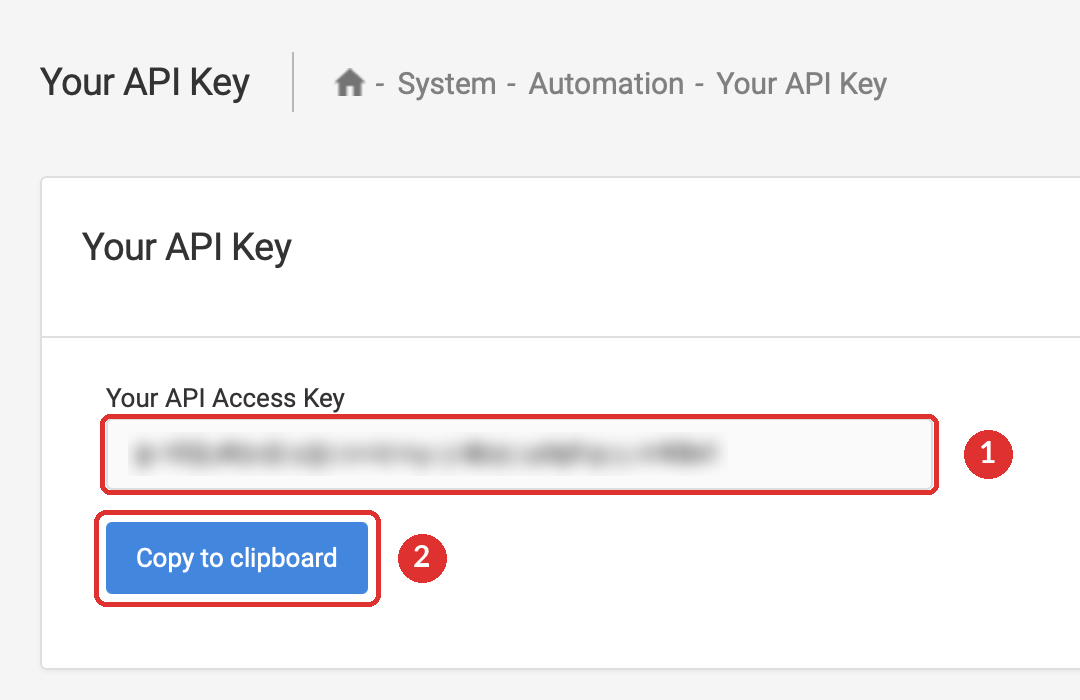
- The Your API Key page opens. Your key is the long line of letters and numbers in the Your API Access Key field. It is blurred in the picture below, on your screen you will see it in full.
- Click Copy to clipboard. The whole key is copied, with no missing characters and no extra spaces.
Paste it where it is needed
Paste the key into the tool you are connecting. Most integrations ask for it as a request header named x-api-key:
x-api-key: YOUR_API_KEY
Content-Type: application/json
Where you will use it
Keep your key safe
Anyone who has your key can act as your account through the API. Treat it like a password.
- Copy it with the Copy to clipboard button.
- Paste it only into tools you set up yourself.
- Blur it before you share a screenshot of the page.
- Send it in chats, emails or support tickets.
- Post it in public code, forums or videos.
- Put it in the code of your landing page, where any visitor can read it.
Think someone else has your key? Write to your account manager or the support chat right away. Say that your API key may be exposed, but don't send the key itself.
Guides that use the API key
Was this article helpful?
Thanks — that helps us prioritise what to rewrite.
Sorry about that. Ask support directly and we’ll get you sorted.